Uppdaterar


iPhone-skärmavbilder


iPad-skärmavbilder


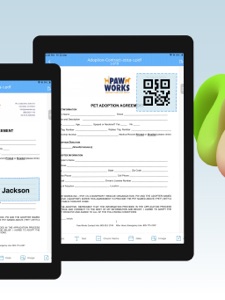


Beskrivning
Need to sign a document or PDF yourself? Require a signature on your docs? eZy sign makes it easy to do both hassle free.
Take control of your paperwork by uploading diverse document types and filling them with signatures, initials, dates, emails, images, or any text be it addresses, phone numbers, and more.
eZy Sign handles docs signing, signature requests, and data filling. It accommodates a variety of document types, including NDAs, agreements, endorsements, permissions, and legal documents. Its versatile functionality extends to common business forms like NDAs, sales contracts, financial agreements, agreements, property contracts, waivers, lease agreements, employment contracts, job offers, and work orders, making it ideal for efficient document management.
Sign Documents:
Whether you prefer drawing your signature, scanning it, our versatile app offers you the flexibility you need. Take control of your paperwork by adding signatures, initials, dates, emails, images, or any required text, from addresses to phone numbers. From formal signatures on legal documents to personalized touches on business agreements and contracts and PDFs.
Send Documents for Signature:
With eZy Sign, sending PDFs for signatures has never been more straightforward. The app allows you to add assign fields, simplifying the process to fill and esign. Supported fields include signature, initials, name, date, email and text. This feature makes the signature collection process a convenient solution for businesses and individuals. After signing, eZy Sign ensures quick file access.
Scanning Documents:
eZy Sign doesn't just stop at signatures, it empowers you to digitize your paperwork. Whether you're dealing with contracts, invoices, legal documents or any other paper-based content, our app's scanning feature ensures that you can transform them into digital marvels. By the power of your device camera, eZy Sign lets you create PDF scans within the app, fostering a paperless and efficient environment.
Fill Documents:
With eZy Sign, document editing becomes a breeze. Whether you need to add a signature, text, date, time, image, page, or QR code, our app offers a comprehensive set of tools for easy customization. Its versatility ensures that you can modify and enhance your PDFs, contracts, and documents according to your specific needs, making document editing an intuitive and efficient process.
Set Expiry:
Security is paramount with eZy Sign. The app introduces a unique feature allowing users to set an expiry date for their digital docs. Exercise control over the duration of accessibility for recipients. Once the expiry date is reached, the document becomes invalid, and recipients cannot access shared files. Customize and extend expiry dates according to your needs.
Multilingual Support:
eZy Sign understands the importance of regional preferences. With multilingual support, users can navigate and use the app in their preferred language. This ensures a user-friendly experience to individual language preferences, making eZy Sign a versatile and accessible solution for docs esigning & scanning. This app supports multiple languages including Dutch, Korean, Italian & more.
Import and Export:
With eZy Sign, enjoy simple and efficient document sharing. This feature ensures that you can easily import documents from various sources and export them to share or archive as needed. The app's compatibility with different importing and exporting options ensures easy access and collaboration across various systems.
- DropBox
- Google Drive
- OneDrive
- Email
- iCloud
History:
Keeping users informed and in control, eZy Sign incorporates a detailed history feature. You can keep track of your document activities with eZy Sign's detailed history feature. View past signatures, and access records of contracts, agreements, and PDFs interactions.
Submit your questions or feedback to: support+ezysign@whizpool.com
Agreements and Terms:
https://ezy-sign.com/terms.html
Nyheter i version 3.2
Discover new improved features!
- New Design & Themes
- Bug Fixes
Säljare
Namn
Whizpool
Information
Utvecklare
Kategorier
Version
3.2
Storlek
79,4 MB
Game Center
Nej
VPP Device Licensing
Ja
Betyg
Åldersgräns: 4+
Kompatibilitet
iOS 15.2 eller senare
Enheter
iPhone 5s, iPhone 6, iPhone 6 Plus, iPhone 6s, iPhone 6s Plus, iPhone SE, iPhone 7, iPhone 7 Plus, iPhone 8, iPhone 8 Plus, iPhone X, iPhone XR, iPhone XS, iPhone XS Max, iPhone 11, iPhone 11 Pro, iPhone 11 Pro Max, iPhone SE (2:a generationen), iPhone 12, iPhone 12 Pro, iPhone 12 Pro Max, iPhone 12 mini, iPhone 13, iPhone 13 Pro, iPhone 13 Pro Max, iPhone 13 mini, iPhone SE (3:e generationen), iPhone 14, iPhone 14 Plus, iPhone 14 Pro, iPhone 14 Pro Max, iPhone 15, iPhone 15 Plus, iPhone 15 Pro, iPhone 15 Pro Max, iPhone 16, iPhone 16Plus, iPhone 16Pro, iPhone 16ProMax, iPad (5:e generationen) Wi-Fi, iPad (5:e generationen) Wi-Fi + Cellular, iPad (6:e generationen) Wi-Fi, iPad (6:e generationen) Wi-Fi + Cellular, iPad Pro, iPad Pro (Cellular), iPad Pro (9,7-tums), iPad Pro (9,7-tums) (Cellular), iPad Pro 12,9 tum (2:a generationen), iPad Pro 12,9 tum (2:a generationen) Wi-Fi + Cellular, iPad Pro (10,5 tum), iPad Pro (10,5 tum) Wi-Fi + Cellular, iPad Pro (11 tum), iPad Pro (11 tum) Wi-Fi + Cellular, iPad Pro 12,9 tum (tredje generationen), iPad Pro 12,9 tum (tredje generationen) Wi-Fi + Cellular, iPad Air, iPad Air (Cellular), iPad Air 2, iPad Air 2 (Cellular), iPad Air (tredje generationen), iPad Air (tredje generationen) Wi-Fi + Cellular, iPad mini Retina, iPad mini Retina (Cellular), iPad mini 3, iPad mini 3 (Cellular), iPad mini 4, iPad mini 4 (Cellular), iPad mini (5:e generationen), iPad mini (5:e generationen) Wi-Fi + Cellular, iPad (7:e generationen) Wi-Fi + Cellular, iPad Pro 11 tum (2:a generationen), iPad Pro 11 tum (2:a generationen) Wi-Fi + Cellular, iPad Pro 12,9 tum (4:e generationen), iPad Pro 12,9 tum (4:e generationen) Wi-Fi + Cellular, iPad Air (fjärde generationen) (Wi-Fi), iPad Air (fjärde generationen) (Wi-Fi + Cellular), iPad (8:e generationen) Wi-Fi, iPad (8:e generationen) Wi-Fi + Cellular, iPad Pro 11 tum (tredje generationen), iPad Pro 11 tum (tredje generationen) Wi-Fi + Cellular, iPad Pro 12,9 tum (5:e generationen), iPad Pro 12,9 tum (5:e generationen) Wi-Fi + Cellular, iPad (9:e generationen), iPad (9:e generationen) Wi-Fi + Cellular, iPad mini (6:e generationen), iPad mini (6:e generationen) Wi-Fi + Cellular, iPad Air (5:e generationen), iPad Air (5:e generationen) Wi-Fi + Cellular, iPad Pro 11 tum (fjärde generationen), iPad Pro 11 tum (fjärde generationen) Wi-Fi + Cellular, iPad Pro 12,9 tum (6:e generationen), iPad Pro 12,9 tum (6:e generationen) Wi-Fi + Cellular, iPad (10:e generationen), iPad (10:e generationen) Wi-Fi + Cellular, iPad Air 11 tum (M2) Wi-Fi, iPad Air 13 tum (M2) Wi-Fi, iPad Air 13 tum (M2) Wi-Fi + Cellular, iPad Pro 11 tum (M4) Wi-Fi, iPad Pro 11 tum (M4) Wi-Fi + Cellular, iPad Pro 13 tum (M4) Wi-Fi, iPad Pro 13 tum (M4) Wi-Fi + Cellular, iPad MiniA17Pro, iPad MiniA17ProCellular, iPod touch (sjätte generationen), iPod touch (7:e generationen)
Språk
engelska, franska, italienska, japanska, kinesiska, koreanska, nederländska, portugisiska, spanska, tyska
App Store: Kundbetyg
Betyg och recensioner
0,0 av 5 (Inget betyg)
App Store: Kundrecensioner
Ingen post