OmVillkorSekretessKontakt
 
Uppdaterar
instax SHARE

instax SHARE

Släppt: 2014-01-06
© FUJIFILM Corporation
instax SHARE - QR Code
Version 3.4.6
4+
Hämta i App Store
Version 3.4.6
4+
Hämta i App Store
Släppt: 2014-01-06
© FUJIFILM Corporation

iPhone-skärmavbilder

Skärmdump
Skärmdump
Skärmdump
Skärmdump

iPad-skärmavbilder

Skärmdump
Skärmdump
Skärmdump
Skärmdump

Beskrivning

The "instax SHARE" is FUJIFILM official application that can be used to print images from smartphones to instax SHARE smartphone printer.
[Select Your Best Shot!]
"instax SHARE" is an app to print images from your smartphone with the smartphone printer instax SHARE SP-1/SP-2/SP-3(FUJIFILM). You can enjoy beautiful instax print by simply selecting best shots in your smartphone or tablet within less than a minute.
[Supported Printer]
FUJIFILM instax SHARE Smartphone Printer SP-1/SP-2/SP-3
* Not support to old model printers.
[Caution]
(1)iCloud
If you want to print a picture stored in iCloud, save it to your device first and then print it.
(2) Permissions setting of "instax SHARE" application.
Some or all of the functions can not be used unless you enable the following permissions of "instax SHARE" application.
Please enable the authority by referring to the following procedure.
After installation, you will be asked for permission when using the following functions for the first time, please enable it.
The "Take a picture" function need the "Camera" permission.
The "Real time template" function need the "Camera" permission and the "Location" permission.
"Selection from Photos" function need the "Photos" permission.
If the authority is set to invalid, please enable it with the following operation.
--Example of operation on iPhone 6s (iOS 10.3.3)--
1.Tap "Settings"
2.Tap "instax SHARE"
3."ALLOW INSTAX SHARE TO ACCESS"
Please enable all of "Camera" "Photo" "Location".
Note: If you have not used the following functions ,these permission settings wil not be displayed.
The "Camera" permission has required by the "Take a picture" function and the "Real time template" function.
"Location" permission has required by the "Real time template" function.
The "Photos" permission has required by the "Selection from Photos" function.
[How to print]
Print photos taken with smartphones.
1. Turn on the printer.
2. **Important** By "Settings" app on your smartphone device, Choose "Wi-Fi", turn on the Wi-Fi, and choose and connect the printer SSID (INSTAX-xxxxxxxx, wrote at printer bottom) from the "CHOOSE A NETWORK..." list. (Excute once, will be connected automatically from the next time.)
3. Launch the instax SHARE app.
4. Select image from Photos or SNS, or take photo with a smartphone camera.
5. Once image is selected, press Edit and edit the image (scaling, rotate, filter and template).
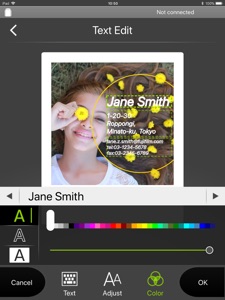
6. Post message on a template if template which accepts text is selected.
7. Press "Connect and print." when editting is completed.
8. When you print for the first time, will be asked password for the printer, please enter initial password that is wrote in User's Guide of the printer.
[When you can not update in AppStore]
Phenomenon:
On the AppStore update screen, the instaxSHARE application is displayed in "Available Updates"
However ,Sometimes "Update button" has been changed to "open button",and con not be updated.
Workaround:
Please uninstall the instaxSHARE application and reinstall it.
(When reinstalling, "Reprint image" saved in the application will be cleared.)

Nyheter i version 3.4.6

Fixed minor bugs.

Säljare

Namn

FUJIFILM Corporation

URL

Information

Kategorier

Version

3.4.6

Storlek

63 MB

Game Center

Nej

VPP Device Licensing

Ja

Betyg

Åldersgräns: 4+

Kompatibilitet

iOS 11.0 eller senare

Enheter

iPhone 5s, iPhone 6, iPhone 6 Plus, iPhone 6s, iPhone 6s Plus, iPhone SE, iPhone 7, iPhone 7 Plus, iPhone 8, iPhone 8 Plus, iPhone X, iPhone XR, iPhone XS, iPhone XS Max, iPhone 11, iPhone 11 Pro, iPhone 11 Pro Max, iPhone SE (2:a generationen), iPhone 12, iPhone 12 Pro, iPhone 12 Pro Max, iPhone 12 mini, iPhone 13, iPhone 13 Pro, iPhone 13 Pro Max, iPhone 13 mini, iPhone SE (3:e generationen), iPhone 14, iPhone 14 Plus, iPhone 14 Pro, iPhone 14 Pro Max, iPhone 15, iPhone 15 Plus, iPhone 15 Pro, iPhone 15 Pro Max, iPhone 16, iPhone 16 Plus, iPhone 16 Pro, iPhone 16 Pro Max, iPhone 16e, iPad (5:e generationen) Wi-Fi, iPad (5:e generationen) Wi-Fi + Cellular, iPad (6:e generationen) Wi-Fi, iPad (6:e generationen) Wi-Fi + Cellular, iPad Pro, iPad Pro (Cellular), iPad Pro (9,7-tums), iPad Pro (9,7-tums) (Cellular), iPad Pro 12,9 tum (2:a generationen), iPad Pro 12,9 tum (2:a generationen) Wi-Fi + Cellular, iPad Pro (10,5 tum), iPad Pro (10,5 tum) Wi-Fi + Cellular, iPad Pro (11 tum), iPad Pro (11 tum) Wi-Fi + Cellular, iPad Pro 12,9 tum (tredje generationen), iPad Pro 12,9 tum (tredje generationen) Wi-Fi + Cellular, iPad Air, iPad Air (Cellular), iPad Air 2, iPad Air 2 (Cellular), iPad Air (tredje generationen), iPad Air (tredje generationen) Wi-Fi + Cellular, iPad mini Retina, iPad mini Retina (Cellular), iPad mini 3, iPad mini 3 (Cellular), iPad mini 4, iPad mini 4 (Cellular), iPad mini (5:e generationen), iPad mini (5:e generationen) Wi-Fi + Cellular, iPad (7:e generationen) Wi-Fi + Cellular, iPad Pro 11 tum (2:a generationen), iPad Pro 11 tum (2:a generationen) Wi-Fi + Cellular, iPad Pro 12,9 tum (4:e generationen), iPad Pro 12,9 tum (4:e generationen) Wi-Fi + Cellular, iPad Air (fjärde generationen) (Wi-Fi), iPad Air (fjärde generationen) (Wi-Fi + Cellular), iPad (8:e generationen) Wi-Fi, iPad (8:e generationen) Wi-Fi + Cellular, iPad Pro 11 tum (tredje generationen), iPad Pro 11 tum (tredje generationen) Wi-Fi + Cellular, iPad Pro 12,9 tum (5:e generationen), iPad Pro 12,9 tum (5:e generationen) Wi-Fi + Cellular, iPad (9:e generationen), iPad (9:e generationen) Wi-Fi + Cellular, iPad mini (6:e generationen), iPad mini (6:e generationen) Wi-Fi + Cellular, iPad Air (5:e generationen), iPad Air (5:e generationen) Wi-Fi + Cellular, iPad Pro 11 tum (fjärde generationen), iPad Pro 11 tum (fjärde generationen) Wi-Fi + Cellular, iPad Pro 12,9 tum (6:e generationen), iPad Pro 12,9 tum (6:e generationen) Wi-Fi + Cellular, iPad (10:e generationen), iPad (10:e generationen) Wi-Fi + Cellular, iPad Air 11 tum (M2) Wi-Fi, iPad Air 13 tum (M2) Wi-Fi, iPad Air 13 tum (M2) Wi-Fi + Cellular, iPad Pro 11 tum (M4) Wi-Fi, iPad Pro 11 tum (M4) Wi-Fi + Cellular, iPad Pro 13 tum (M4) Wi-Fi, iPad Pro 13 tum (M4) Wi-Fi + Cellular, iPad mini (A17 Pro) Wi-Fi, iPad mini (A17 Pro) Wi-Fi + Cellular, iPad (A16) Wi-Fi, iPad (A16) Wi-Fi + Cellular, iPad Air 11 tum (M3) Wi-Fi, iPad Air 11 tum (M3) Wi-Fi + Cellular, iPad Air 13 tum (M3) Wi-Fi, iPad Air 13 tum (M3) Wi-Fi + Cellular, iPod touch (sjätte generationen), iPod touch (7:e generationen)

Språk

engelska, franska, japanska, kinesiska, koreanska, polska, portugisiska, spanska, tjeckiska, tyska

App Store: Kundbetyg

Betyg och recensioner

1,5 av 5 (13 betyg)

App Store: Kundrecensioner

2019-10-02

IOS 13

The connection to the printer needs to be fixed for IOS 13
granatapple
Version 3.4.1
2019-09-30

IOS 13

The connection to printer is broken for iPhones
EVelefant
Version 3.4.1
2019-09-29

IOS 13

It doesn’t work on iOS 13.
hector.zarate
Version 3.4.1
2018-04-29

Can’t download updates!!

Apparently there are some updates available..but I can’t download them and I am not able to use the app either! I tried to remove the app and install it but it doesn’t work. It wouldn’t even download the app, and this happens only with the Instax Share one as I don’t have any issues with others. Can you please fix the problem? My SP-2 printer is brand new and not cheap so do something about it! Without the app is completely useless!!!
Maggiedese
Version 3.3.6