Uppdaterar


iPhone-skärmavbilder



iPad-skärmavbilder


Beskrivning
Function Introduction:
1. BoardNotes uses Apple native pen technology and provides customized parameter adjustments (pressure, smoothness, speed) to provide you with a smooth and precise writing experience.
2. Choose from a variety of brushes (such as ballpoint pens, pens, pencils, markers, watercolors, filling pens, etc.) to unleash your creative potential.
3. Lasso tools can not only capture handwritten notes, but also retrieve cards, thumbnails, links, and connections, making your notes organized quickly and easily.
4. The handwriting function supports Apple Pencil, third-party pen manufacturers, and your fingertips.
5. Stop and long press to generate a perfect shape.
6. Except for handwritten notes, all other content on the whiteboard is presented in the form of cards, whether it is text, web pages, images, videos, audio, files, PDFs, they are all cards. You can combine the cards on the whiteboard to unleash your creative potential.
7. Connect cards or handwritten notes with wires, allowing you to easily understand the interrelationships between notes.
8. Using links to associate notes, whether it's notes from the same whiteboard or other whiteboards, you can quickly locate them by jumping through the links.
9. By searching, you can quickly locate notes on the large whiteboard.
10. Use thumbnails to mark your notes, allowing you to quickly find the notes marked with thumbnails.
11. By providing different paper styles and background colors, you can always find one you like.
12. On iPad, it supports opening two whiteboards at the same time. The notes in both whiteboards can be selected and long pressed through lasso, and then dragged to another whiteboard, greatly improving work efficiency.
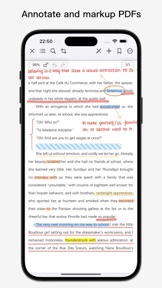
13. PDF reading, annotation (highlighting, underlining, through lines), handwritten annotation, bookmark collection, and annotation content support dragging onto the whiteboard, making your learning more efficient.
14. The notes on the whiteboard support exporting images, and the entire whiteboard data can be exported and saved, as well as imported into. boardNotes files.
15. Support the creation of folders to categorize notes, as well as the ability to bookmark notes.
Download BoardNotes for free on iPad and iPhone.
If you have any suggestions, please contact us using the feedback function within the application.
Nyheter i version 0.7.6
1. Fixed some bugs.
Information
Utvecklare
Kategorier
Version
0.7.6
Storlek
163,6 MB
Game Center
Nej
VPP Device Licensing
Ja
Betyg
Åldersgräns: 17+
Kompatibilitet
iOS 15.0 eller senare
Enheter
iPhone 5s, iPhone 6, iPhone 6 Plus, iPhone 6s, iPhone 6s Plus, iPhone SE, iPhone 7, iPhone 7 Plus, iPhone 8, iPhone 8 Plus, iPhone X, iPhone XR, iPhone XS, iPhone XS Max, iPhone 11, iPhone 11 Pro, iPhone 11 Pro Max, iPhone SE (2:a generationen), iPhone 12, iPhone 12 Pro, iPhone 12 Pro Max, iPhone 12 mini, iPhone 13, iPhone 13 Pro, iPhone 13 Pro Max, iPhone 13 mini, iPhone SE (3:e generationen), iPhone 14, iPhone 14 Plus, iPhone 14 Pro, iPhone 14 Pro Max, iPhone 15, iPhone 15 Plus, iPhone 15 Pro, iPhone 15 Pro Max, iPhone 16, iPhone 16Plus, iPhone 16Pro, iPhone 16ProMax, iPad (5:e generationen) Wi-Fi, iPad (5:e generationen) Wi-Fi + Cellular, iPad (6:e generationen) Wi-Fi, iPad (6:e generationen) Wi-Fi + Cellular, iPad Pro, iPad Pro (Cellular), iPad Pro (9,7-tums), iPad Pro (9,7-tums) (Cellular), iPad Pro 12,9 tum (2:a generationen), iPad Pro 12,9 tum (2:a generationen) Wi-Fi + Cellular, iPad Pro (10,5 tum), iPad Pro (10,5 tum) Wi-Fi + Cellular, iPad Pro (11 tum), iPad Pro (11 tum) Wi-Fi + Cellular, iPad Pro 12,9 tum (tredje generationen), iPad Pro 12,9 tum (tredje generationen) Wi-Fi + Cellular, iPad Air, iPad Air (Cellular), iPad Air 2, iPad Air 2 (Cellular), iPad Air (tredje generationen), iPad Air (tredje generationen) Wi-Fi + Cellular, iPad mini Retina, iPad mini Retina (Cellular), iPad mini 3, iPad mini 3 (Cellular), iPad mini 4, iPad mini 4 (Cellular), iPad mini (5:e generationen), iPad mini (5:e generationen) Wi-Fi + Cellular, iPad (7:e generationen) Wi-Fi + Cellular, iPad Pro 11 tum (2:a generationen), iPad Pro 11 tum (2:a generationen) Wi-Fi + Cellular, iPad Pro 12,9 tum (4:e generationen), iPad Pro 12,9 tum (4:e generationen) Wi-Fi + Cellular, iPad Air (fjärde generationen) (Wi-Fi), iPad Air (fjärde generationen) (Wi-Fi + Cellular), iPad (8:e generationen) Wi-Fi, iPad (8:e generationen) Wi-Fi + Cellular, iPad Pro 11 tum (tredje generationen), iPad Pro 11 tum (tredje generationen) Wi-Fi + Cellular, iPad Pro 12,9 tum (5:e generationen), iPad Pro 12,9 tum (5:e generationen) Wi-Fi + Cellular, iPad (9:e generationen), iPad (9:e generationen) Wi-Fi + Cellular, iPad mini (6:e generationen), iPad mini (6:e generationen) Wi-Fi + Cellular, iPad Air (5:e generationen), iPad Air (5:e generationen) Wi-Fi + Cellular, iPad Pro 11 tum (fjärde generationen), iPad Pro 11 tum (fjärde generationen) Wi-Fi + Cellular, iPad Pro 12,9 tum (6:e generationen), iPad Pro 12,9 tum (6:e generationen) Wi-Fi + Cellular, iPad (10:e generationen), iPad (10:e generationen) Wi-Fi + Cellular, iPad Air 11 tum (M2) Wi-Fi, iPad Air 13 tum (M2) Wi-Fi, iPad Air 13 tum (M2) Wi-Fi + Cellular, iPad Pro 11 tum (M4) Wi-Fi, iPad Pro 11 tum (M4) Wi-Fi + Cellular, iPad Pro 13 tum (M4) Wi-Fi, iPad Pro 13 tum (M4) Wi-Fi + Cellular, iPad MiniA17Pro, iPad MiniA17ProCellular, iPod touch (sjätte generationen), iPod touch (7:e generationen), Mac Desktop
Språk
engelska, kinesiska
App Store: Kundbetyg
Betyg och recensioner
0,0 av 5 (Inget betyg)
App Store: Kundrecensioner
Ingen post