OmVillkorSekretessKontakt
 
Uppdaterar
Cross Stitch Camera

Cross Stitch Camera

Släppt: 2013-01-16
© 2014 J2WORK
Cross Stitch Camera - QR Code
Version 1.73
4+
Hämta i App Store
Version 1.73
4+
Hämta i App Store
Släppt: 2013-01-16
© 2014 J2WORK

iPhone-skärmavbilder

Skärmdump
Skärmdump
Skärmdump
Skärmdump
Skärmdump

Beskrivning

### Featured in iTunes in 140 places around the world. ###
### Cross Stitch Camera is ranked 7th in Photo & Video category in Sweden. ###
*** Announcing the world's first iPhone Cross-Stitch Pattern App! ***
“Check out this amazing iPhone app - you’ll wonder how you ever lived without it!”
by Sarah Trevor, Editor, Cross Stitch Crazy Magazine.
"This is a must have app if you’re into cross stitching, but it’s also a great addition to the photo arsenals of picture editing enthusiasts."
by Juli Clover, Writer, AppAdvice.com
"With Cross Stitch Camera connects you cross stitch with modern technology."
  by Johan Wallén, Writer, MacWorld, Sweden
-----------------------------------------------------
Introducing Cross Stitch Camera app - YouTube
http://youtu.be/z2OxqHDqOJE
-----------------------------------------------------
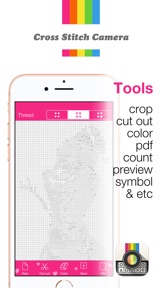
Now photograph anything anywhere with your iPhone...people, places, or things and immediately create real Cross-Stitch patterns (this is not simply a filter!). Choose the colors you desire using DMC cotton thread, your desired grid size, and thread count. Your pattern appears in easy to read symbols for DMC colors and your thread color table can be saved and printed in PDF format.
This new App changes your Cross Stitch options and experience. What are you waiting for? Simply download this amazing new iPhone App today and start Cross-Stitching!
Quick Start:
0. Take a photo or select a photo in a gallery
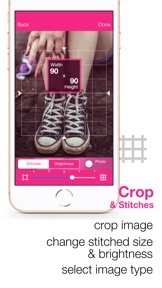
1. Crop a photo - change stitches count, brightness, and image type for the best result
2. Select cut out button to cut out image - out line the part of your image you want to select. Then press contract.
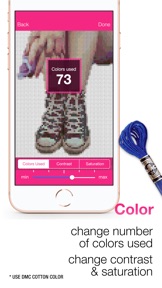
3. Select color button to change the number of colors used, contrast, and saturation
4. Save stitch image as PNG and patterns(with color table) as PDF
5. Select info button to count fabric size and change cloth count
*After changing contrast and saturation or cutting, please come back to the color used to change the maximum number of colors. Adjust the desired number of colors again.
How to save in PDF in Cross Stitch Camera?
-----------------------------------------------------
First you click export button(placed on top right in save windows).
Please send an email to yourself or a friend. Then you can find in your mail-box and you can print it later. Or, when you export PDF, if you have any free PDF reader app, you select that app(the icon is appeared). Once it is opened, it is saved on list.
In PDF, the patterns(with a lined grid) and color table will be saved.
-----------------------------------------------------
For more information, visit the following page:
http://www.j2work.com
Please follow us here:
Facebook: facebook.com/j2work.apps
Contact us here:
contact@j2work.com
-----------------------------------------------------

Nyheter i version 1.73

This app has been updated by Apple to use the latest Apple signing certificate.
2018.8.23 Bug fixed (color change, gallery...)
Thank you Michelle for submitting bug report.

Säljare

Namn

J2WORK Co., Ltd.

Information

Kategorier

Version

1.73

Storlek

77,8 MB

Game Center

Nej

VPP Device Licensing

Ja

Betyg

Åldersgräns: 4+

Kompatibilitet

iOS 11.0 eller senare

Enheter

iPhone 5s, iPhone 6, iPhone 6 Plus, iPhone 6s, iPhone 6s Plus, iPhone SE, iPhone 7, iPhone 7 Plus, iPhone 8, iPhone 8 Plus, iPhone X, iPhone XR, iPhone XS, iPhone XS Max, iPhone 11, iPhone 11 Pro, iPhone 11 Pro Max, iPhone SE (2:a generationen), iPhone 12, iPhone 12 Pro, iPhone 12 Pro Max, iPhone 12 mini, iPhone 13, iPhone 13 Pro, iPhone 13 Pro Max, iPhone 13 mini, iPad (5:e generationen) Wi-Fi, iPad (5:e generationen) Wi-Fi + Cellular, iPad (6:e generationen) Wi-Fi, iPad (6:e generationen) Wi-Fi + Cellular, iPad Pro, iPad Pro (Cellular), iPad Pro (9,7-tums), iPad Pro (9,7-tums) (Cellular), iPad Pro 12,9 tum (2:a generationen), iPad Pro 12,9 tum (2:a generationen) Wi-Fi + Cellular, iPad Pro (10,5 tum), iPad Pro (10,5 tum) Wi-Fi + Cellular, iPad Pro (11 tum), iPad Pro (11 tum) Wi-Fi + Cellular, iPad Pro 12,9 tum (tredje generationen), iPad Pro 12,9 tum (tredje generationen) Wi-Fi + Cellular, iPad Air, iPad Air (Cellular), iPad Air 2, iPad Air 2 (Cellular), iPad Air (tredje generationen), iPad Air (tredje generationen) Wi-Fi + Cellular, iPad mini Retina, iPad mini Retina (Cellular), iPad mini 3, iPad mini 3 (Cellular), iPad mini 4, iPad mini 4 (Cellular), iPad mini (5:e generationen), iPad mini (5:e generationen) Wi-Fi + Cellular, iPad (7:e generationen) Wi-Fi + Cellular, iPad Pro 11 tum (2:a generationen), iPad Pro 11 tum (2:a generationen) Wi-Fi + Cellular, iPad Pro 12,9 tum (4:e generationen), iPad Pro 12,9 tum (4:e generationen) Wi-Fi + Cellular, iPad Air (fjärde generationen) (Wi-Fi), iPad Air (fjärde generationen) (Wi-Fi + Cellular), iPad (8:e generationen) Wi-Fi, iPad (8:e generationen) Wi-Fi + Cellular, iPad Pro 11 tum (tredje generationen), iPad Pro 11 tum (tredje generationen) Wi-Fi + Cellular, iPad Pro 12,9 tum (5:e generationen), iPad Pro 12,9 tum (5:e generationen) Wi-Fi + Cellular, iPad (9:e generationen), iPad (9:e generationen) Wi-Fi + Cellular, iPad mini (6:e generationen), iPad mini (6:e generationen) Wi-Fi + Cellular, iPod touch (sjätte generationen), iPod touch (7:e generationen)

Språk

engelska

App Store: Kundbetyg

Betyg och recensioner

1,5 av 5 (5 betyg)

App Store: Kundrecensioner

2018-12-28

Fix the app crashing please

This would be a perfect app if it didn’t crash whenever I try to create a pdf, please fix or I want my money back.
Luftslott
Version 1.73