OmVillkorSekretessKontakt
 
Uppdaterar
Bubble level and Clinometer

Bubble level and Clinometer

Släppt: 2009-02-12
© 2019 plaincode
Bubble level and Clinometer - QR Code
Version 4.9.2
4+
Hämta i App Store
Version 4.9.2
4+
Hämta i App Store
Släppt: 2009-02-12
© 2019 plaincode

iPhone-skärmavbilder

Skärmdump
Skärmdump
Skärmdump
Skärmdump
Skärmdump

iPad-skärmavbilder

Skärmdump
Skärmdump
Skärmdump
Skärmdump
Skärmdump

Beskrivning

In this the limited but therefore free version of Clinometer. It as all features but can not be calibrated. This professional tool called Clinometer is the most precise (all you can get with some calculations) slope measurement tool for the iPhone, iPod Touch and iPad. It can be used for simple applications like aligning a frame as well as for more sophisticated fields of applications where an arbitrary slope needs to be measured exactly. Read the reviews (and write your own) for all the applications you find! Thank for all your positive feedback! Please use our support link if you have questions and suggestions, we don't read the iTunes reviews every day.
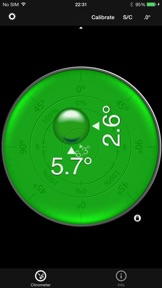
With this tool, the slope can be measured by all edges of the device in every direction. When the device is put flat on the table a bubble view will fade in. The current features include:
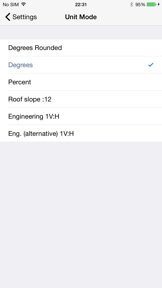
◆ Five different unit modes: The device can display the slope in degrees (rounded or in tenth of degrees), percentage, rise over run (common for roof slope measurement in :12) and 1V:H (common in engineering)
◆ Dial Rotation: You can smoothly rotate the background dial and thus define which side of the device represents 0° and 90° degrees.
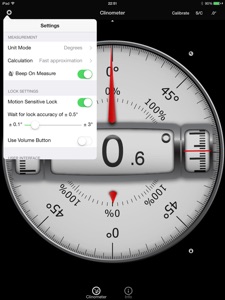
◆ Motion-sensitive Lock feature: Besides the common instant simple tap hold mechanism you can activate the motion-sensitive lock. If activated the device waits for the final lock until you hold your device steady enough for at least 2 seconds. You can set the lock sensitivity between 0.1° and 1.0° degrees.
◆ Volume Button Lock: Use volume buttons to trigger the lock.
◆ Peer Mode: Use two devices to measure angles: One as a display, the other as the measurement device that can be attached to the hardware you want to align.
◆ Fullscreen Mode: The full screen mode can be toggled by tapping the center of the screen and by the upper and lower arrows in the center. This prevents you from erroneous inputs while measuring.
◆ Different color schemes: Press the S/C Button to instantly switch the color. The color can be selected differently for the bubble and the clinometer mode. The predefined color sets include day and night color schemes (Black on White, White on Black and Red).
◆ Adjustable Auto-Lock: You can prevent the device from turning into the sleep mode.
Only the full version has a two way calibration feature!
Please support us and buy the full version if you can.
According to wikipedia: An inclinometer or clinometer is an instrument for measuring angles of slope (or tilt), elevation or inclination of an object with respect to gravity. It is also known as a tilt meter, tilt indicator, slope alert, slope gauge, gradient meter, gradiometer, level gauge, level meter, declinometer, and pitch & roll indicator.
For recreational use only. After the calibration it CAN (!) be very accurate especially for the main axis after calibration. The measurement is performed as well as possible (we try our best) by using the three inbuilt accelerometers.
THANK YOU FOR YOUR SUPPORT!
We will improve the application long-term. This was the first application of this kind shortly after the opening of the App Store. Since then it is continuously updated and enriched with new features.
► Check out all our products (free and paid) on www.plaincode.com

Nyheter i version 4.9.2

- Bugfixes and performance improvements

Information

Utvecklare

Kategorier

Version

4.9.2

Storlek

20,9 MB

Game Center

Nej

VPP Device Licensing

Ja

Betyg

Åldersgräns: 4+

Kompatibilitet

iOS 10.0 eller senare

Enheter

iPhone 5, iPhone 5c, iPhone 5s, iPhone 6, iPhone 6 Plus, iPhone 6s, iPhone 6s Plus, iPhone SE, iPhone 7, iPhone 7 Plus, iPhone 8, iPhone 8 Plus, iPhone X, iPhone XR, iPhone XS, iPhone XS Max, iPhone 11, iPhone 11 Pro, iPhone 11 Pro Max, iPhone SE (2:a generationen), iPhone 12, iPhone 12 Pro, iPhone 12 Pro Max, iPhone 12 mini, iPhone 13, iPhone 13 Pro, iPhone 13 Pro Max, iPhone 13 mini, iPhone SE (3:e generationen), iPad (fjärde generationen) (Wi-Fi), iPad (fjärde generationen) (4G), iPad (5:e generationen) Wi-Fi, iPad (5:e generationen) Wi-Fi + Cellular, iPad (6:e generationen) Wi-Fi, iPad (6:e generationen) Wi-Fi + Cellular, iPad Pro, iPad Pro (Cellular), iPad Pro (9,7-tums), iPad Pro (9,7-tums) (Cellular), iPad Pro 12,9 tum (2:a generationen), iPad Pro 12,9 tum (2:a generationen) Wi-Fi + Cellular, iPad Pro (10,5 tum), iPad Pro (10,5 tum) Wi-Fi + Cellular, iPad Pro (11 tum), iPad Pro (11 tum) Wi-Fi + Cellular, iPad Pro 12,9 tum (tredje generationen), iPad Pro 12,9 tum (tredje generationen) Wi-Fi + Cellular, iPad Air, iPad Air (Cellular), iPad Air 2, iPad Air 2 (Cellular), iPad Air (tredje generationen), iPad Air (tredje generationen) Wi-Fi + Cellular, iPad mini Retina, iPad mini Retina (Cellular), iPad mini 3, iPad mini 3 (Cellular), iPad mini 4, iPad mini 4 (Cellular), iPad mini (5:e generationen), iPad mini (5:e generationen) Wi-Fi + Cellular, iPad (7:e generationen) Wi-Fi + Cellular, iPad Pro 11 tum (2:a generationen), iPad Pro 11 tum (2:a generationen) Wi-Fi + Cellular, iPad Pro 12,9 tum (4:e generationen), iPad Pro 12,9 tum (4:e generationen) Wi-Fi + Cellular, iPad Air (fjärde generationen) (Wi-Fi), iPad Air (fjärde generationen) (Wi-Fi + Cellular), iPad (8:e generationen) Wi-Fi, iPad (8:e generationen) Wi-Fi + Cellular, iPad Pro 11 tum (tredje generationen), iPad Pro 11 tum (tredje generationen) Wi-Fi + Cellular, iPad Pro 12,9 tum (5:e generationen), iPad Pro 12,9 tum (5:e generationen) Wi-Fi + Cellular, iPad (9:e generationen), iPad (9:e generationen) Wi-Fi + Cellular, iPad mini (6:e generationen), iPad mini (6:e generationen) Wi-Fi + Cellular, iPad Air (5:e generationen), iPad Air (5:e generationen) Wi-Fi + Cellular, iPod touch (sjätte generationen), iPod touch (7:e generationen), Apple Watch Series 4, Apple Watch Series 5, Apple Watch Series 6 (GPS), Apple Watch Series 6 (GPS + Cellular), Apple Watch Series SE (GPS), Apple Watch Series SE (GPS + Cellular), Apple Watch Series 7 (GPS), Apple Watch Series 7 (GPS + Cellular)

Språk

engelska, franska, tyska

App Store: Kundbetyg

Betyg och recensioner

5,0 av 5 (1 betyg)

App Store: Kundrecensioner

2013-05-15

Kul

Rolig och bra app, verkar funka bra.
Beb3380
Version 3.7
2013-04-23

Kanonbra!

Den är överraskande exakt, men kan givetvis inte ersätta proffsinstrument. Finesser som att "frysa" ett mätresultat och använda en annan iPhone, iPad eller iPod Touch som display, är en fiffig bonus.
Jonnie Bojj
Version 3.5
2013-02-12

Wonderful!

A well designed smoothly working little tool.
Sopmaskin
Version 3.5
2013-01-22

Good job !

It is easy , advanced and helpful ! Good job ;-)
BabylonCity2013
Version 3.5
2013-01-12

Awesome!

Skitbra! Inte 1,7 grader off i min telefon.
Kalrot
Version 3.5
2012-12-16

Nice app but measurement is off

The app looks nice but its off by a few degrees. I put up a shelf using the app and it didnt look quite right angled. So I downloaded another, similar app which showed that the shelf was off by 1.7 degrees.
Simich_86
Version 3.5
2012-10-16

Me

Great keep on
marevci
Version 3.5
2012-10-15

Awesome app.

Excellent
Salv8or
Version 3.5