OmVillkorSekretessKontakt
 
Uppdaterar
Klipsch Connect

Klipsch Connect

Släppt: 2020-03-06
© 2020-2023 Klipsch Group, Inc.
Klipsch Connect - QR Code
Version 1.20.0
4+
Hämta i App Store
Version 1.20.0
4+
Hämta i App Store
Släppt: 2020-03-06
© 2020-2023 Klipsch Group, Inc.

iPhone-skärmavbilder

Skärmdump
Skärmdump
Skärmdump
Skärmdump
Skärmdump
Skärmdump
Skärmdump

iPad-skärmavbilder

Skärmdump
Skärmdump
Skärmdump
Skärmdump
Skärmdump

Beskrivning

Need support or have a feature suggestion? Please reach out to our Product Support team:
• Live Chat in the App or
• https://support.klipsch.com or
• +1-800-KLIPSCH
Klipsch Connect™ works with:
• The One Plus and The Three Plus tabletop speakers
• The Fives, The Sevens, The Nines, and The Nines McLaren powered monitors
• Cinema 700, 800 and 1200 Series soundbars
• Cinema 600 Series soundbar
• T5 Series True Wireless earphones
• T5 II series True Wireless earphones
• T5 II ANC series True Wireless earphones
You can easily personalize your experience by adjusting EQ, transparency, and ANC settings. Soundbar and Powered Monitor products all support Virtual Remote Control. You can install feature updates, troubleshoot common issues, contact product support - including in-app Live Chat, and much more.
Features (availability varies by product):
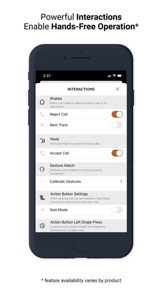
• Virtual Remote Control
• EQ Presets
• Custom EQ Adjustments
• ANC Level Control
• Transparency Mode & Level
• Dirac HD Sound
• Dynamic Bass Control - a.k.a. "Loudness"
• Room Placement Control - a.k.a. "Bass Cut Mode"
• Dolby Atmos (tm) Sound Mode Control
• Night Mode and Dialog Mode Control
• Channel-Specific Volume Control
• Subwoofer Volume Control
• Bragi AI, Moves & Sidekicks
• Battery Level & Status
• Live Chat with Support (during business hours)
• Quick-Start Guides & Product Manuals
• How-To Videos and FAQs
• Product Firmware and Feature Updates
• Product Registration
• Easy Access to Product Support
IMPORTANT FIVES UPDATE: If you cannot connect after you run the Fives Updater app, that means Step 1 did not complete successfully. Make sure to run the USB update. If you need help, we're here for you - please reach out to Product Support (link below) and we'll help you complete the update.
How to Access Cinema Soundbar and Fives, Sevens, and Nines Virtual Remote Capabilities:
Cinema 1200, 800, and 700
Virtual Remote Control and EQ features require the soundbar be running the latest update. This normally happens automatically when the soundbar has been connected to the Internet, either via Klipsch Connect or Google Home. If your device has not been connected to the Internet, please contact our Product Support Team for assistance. See details below.
The Fives, The Sevens, and The Nines, including McLaren Editions
Virtual Remote Control and EQ features require the powered monitors be running the latest update. If you have not updated your Fives already, please download the free "Klipsch The Fives Updater" app. This will walk you through the update process. After the update is complete, all future updates will come through Klipsch Connect. Our Product Support team can walk you through the entire process. Simply reach out to us at:
• Live Chat in the App! or
• https://support.klipsch.com or
• +1-800-KLIPSCH

Nyheter i version 1.20.0

• Added support for Music City products
• Visual improvements
• Tweaks and bug fixes based on customer feedback

Säljare

Namn

Klipsch Group, Inc.

Information

Kategorier

Version

1.20.0

Storlek

267,2 MB

Game Center

Nej

VPP Device Licensing

Ja

Betyg

Åldersgräns: 4+

Kompatibilitet

iOS 12.4 eller senare

Enheter

iPhone 5s, iPhone 6, iPhone 6 Plus, iPhone 6s, iPhone 6s Plus, iPhone SE, iPhone 7, iPhone 7 Plus, iPhone 8, iPhone 8 Plus, iPhone X, iPhone XR, iPhone XS, iPhone XS Max, iPhone 11, iPhone 11 Pro, iPhone 11 Pro Max, iPhone SE (2:a generationen), iPhone 12, iPhone 12 Pro, iPhone 12 Pro Max, iPhone 12 mini, iPhone 13, iPhone 13 Pro, iPhone 13 Pro Max, iPhone 13 mini, iPhone SE (3:e generationen), iPhone 14, iPhone 14 Plus, iPhone 14 Pro, iPhone 14 Pro Max, iPhone 15, iPhone 15 Plus, iPhone 15 Pro, iPhone 15 Pro Max, iPhone 16, iPhone 16Plus, iPhone 16Pro, iPhone 16ProMax, iPhone 16e, iPad (5:e generationen) Wi-Fi, iPad (5:e generationen) Wi-Fi + Cellular, iPad (6:e generationen) Wi-Fi, iPad (6:e generationen) Wi-Fi + Cellular, iPad Pro, iPad Pro (Cellular), iPad Pro (9,7-tums), iPad Pro (9,7-tums) (Cellular), iPad Pro 12,9 tum (2:a generationen), iPad Pro 12,9 tum (2:a generationen) Wi-Fi + Cellular, iPad Pro (10,5 tum), iPad Pro (10,5 tum) Wi-Fi + Cellular, iPad Pro (11 tum), iPad Pro (11 tum) Wi-Fi + Cellular, iPad Pro 12,9 tum (tredje generationen), iPad Pro 12,9 tum (tredje generationen) Wi-Fi + Cellular, iPad Air, iPad Air (Cellular), iPad Air 2, iPad Air 2 (Cellular), iPad Air (tredje generationen), iPad Air (tredje generationen) Wi-Fi + Cellular, iPad mini Retina, iPad mini Retina (Cellular), iPad mini 3, iPad mini 3 (Cellular), iPad mini 4, iPad mini 4 (Cellular), iPad mini (5:e generationen), iPad mini (5:e generationen) Wi-Fi + Cellular, iPad (7:e generationen) Wi-Fi + Cellular, iPad Pro 11 tum (2:a generationen), iPad Pro 11 tum (2:a generationen) Wi-Fi + Cellular, iPad Pro 12,9 tum (4:e generationen), iPad Pro 12,9 tum (4:e generationen) Wi-Fi + Cellular, iPad Air (fjärde generationen) (Wi-Fi), iPad Air (fjärde generationen) (Wi-Fi + Cellular), iPad (8:e generationen) Wi-Fi, iPad (8:e generationen) Wi-Fi + Cellular, iPad Pro 11 tum (tredje generationen), iPad Pro 11 tum (tredje generationen) Wi-Fi + Cellular, iPad Pro 12,9 tum (5:e generationen), iPad Pro 12,9 tum (5:e generationen) Wi-Fi + Cellular, iPad (9:e generationen), iPad (9:e generationen) Wi-Fi + Cellular, iPad mini (6:e generationen), iPad mini (6:e generationen) Wi-Fi + Cellular, iPad Air (5:e generationen), iPad Air (5:e generationen) Wi-Fi + Cellular, iPad Pro 11 tum (fjärde generationen), iPad Pro 11 tum (fjärde generationen) Wi-Fi + Cellular, iPad Pro 12,9 tum (6:e generationen), iPad Pro 12,9 tum (6:e generationen) Wi-Fi + Cellular, iPad (10:e generationen), iPad (10:e generationen) Wi-Fi + Cellular, iPad Air 11 tum (M2) Wi-Fi, iPad Air 13 tum (M2) Wi-Fi, iPad Air 13 tum (M2) Wi-Fi + Cellular, iPad Pro 11 tum (M4) Wi-Fi, iPad Pro 11 tum (M4) Wi-Fi + Cellular, iPad Pro 13 tum (M4) Wi-Fi, iPad Pro 13 tum (M4) Wi-Fi + Cellular, iPad MiniA17Pro, iPad MiniA17ProCellular, iPod touch (sjätte generationen), iPod touch (7:e generationen)

Språk

engelska, franska, indonesiska, italienska, japanska, kinesiska, koreanska, portugisiska, ryska, spanska, tyska

App Store: Kundbetyg

Betyg och recensioner

2,0 av 5 (9 betyg)

App Store: Kundrecensioner

2022-01-01

Crashes on startup!

Since the update last week, the app crashes as soon as it’s started. ☹️
Darrenstreet
Version 1.9.1
2021-10-06

Cant seem to pair

When trying to pair my T5 ANC i get an error message that says something about a ”peripheral id” which isnt mentioned in the manual or customer support articles.
dis boi dont have name
Version 1.7.3
2021-09-05

No point

For my Klipsch The Fives this app doesn’t do much. You cant change the EQ bass mode or see the firmware version. I’ts basically an app that displays an image of The Fives.
Jeoe1024
Version 1.7.3
2021-03-13

Klipsch

This app dosent work😔 I cant get pass the Good to go button becouse it dosnt light up
Smart,tv frälst
Version 1.6.0