Uppdaterar



-1
iPhone-skärmavbilder


iPad-skärmavbilder


Beskrivning
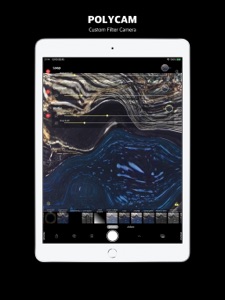
To create a custom filter, use the built-in basic image filters and combine them.
You can also load previously recorded images/videos and record/export.
Filter
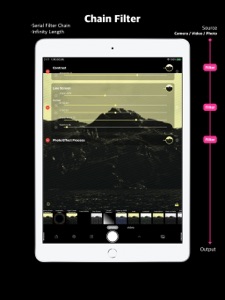
Custom filters are created by connecting filters selected from over 150 collections in series.
For instance, you can do the following:
Camera input-> [Mirror effect-> Monochrome effect-> Glitch effect]-> Display / Recorder
The items inside [] are called chains and can be selected and rearranged as you please.
This chain can be saved, and once created and saved, it can be loaded with one tap.
There are so many filters that it is hard to find immediately, but you can find them by searching or categorizing.
The filters include a built-in iOS filter called Core Image Filter (* 1) and a POLYCAM original filter created with Metal (* 2) shader.
The Loop filter has a built-in feedback circuit that allows you to re-read the output of the previous frame, making it ideal for more experimental video generation and circuit bending.
Generic filters such as StarShine, SunBeam, Lenticular Halo, and Gradient are also included, so you can create generated images.
Output
Full screen output without indicators of 4 outputs.
HDMI, AirPlay, NDI®, Aether, are possible.
Using smooth alpha transitions for almost all transitions, you can create a smooth production when projecting full-screen images using Outputs.
Export
If the source input is selected from photos or videos in the photo album, it can be asynchronously exported to the photo album.
This is different from real-time recording at the time of shooting, and is written in non-real time for each frame.
Smooth videos can be saved even at resolutions and settings that lack the power of the CPU or GPU.
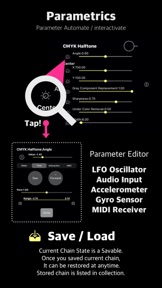
Parametrics
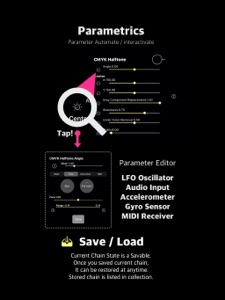
Each filter has several parameters that you can adjust with the sliders to adjust the filter's balance and effect.
Parameters can be automated with the LFO oscillator or random generator.
You can also assign audio input peaks from microphones, accelerometers, gyro sensors, MIDI inputs, etc. for interactive control and create audio visualizers.
Settings
Camera select (internal / external, double, triple also available)
Aspect ratio (Original, 1: 1, 3: 4, 9:16, 4: 3, 16: 9)
Resolution (Original, QD, HD, FHD)
Microphone gain
NDI® on / off (*3)
Aether wireless sender bit rate (*4)
Tint color change
Rotation lock
Saving, sharing, and exporting Chains
The created chain can be saved with the save button at the lower right of the chain table view.
The saved chains are arranged in the collection view, and the chains can be loaded by tapping or dragging and dropping.
You can share the chain by dragging and dropping it on the share mark.
You can send it to macOS or save it to the File app.
Exporting the settings will share the entire collection in the current chain. You can save all the filters you have created or share them with someone. (*5)
Notes:
*1 Core Image Filter Reference - Apple Developer
https://developer.apple.com/library/archive/documentation/GraphicsImaging/Reference/CoreImageFilterReference/index.html#//apple_ref/doc/filter/ci/CIDiscBlur
*2 Metal - Apple Developer
https://developer.apple.com/jp/metal/
* 3 NDI® is a low-latency NewTek IP video library. It is built into various devices and applications such as macOS and Windows, and enables high-quality video communication by wireless or wired connection.
https://www.ndi.tv/
(Currently, POLYCAM's vertical 9:16 transmission has a bug, but it works normally with other aspect ratios.)
* 4 Aether is a low-latency, lightweight original IP video communication framework. It can be sent to Mac via wireless or wired connection and connected to Siphon for use in various applications.
https://sites.google.com/view/aetherframework
* 5 Chains and chain collections saved in the File app can be opened and read from POLYCAM when selected from the File app.
Please send by AirDrop when sharing to other devices.
Nyheter i version 1.0.1
Fixed incapacitated video player issue.
Video Recording is available by Long-pressing shutter button or
Drag shutter button to right to lock recording, and release to center to end recording.
Information
Utvecklare
Kategorier
Version
1.0.1
Storlek
4,4 MB
Game Center
Nej
VPP Device Licensing
Ja
Betyg
Åldersgräns: 4+
Kompatibilitet
iOS 13.0 eller senare
Enheter
iPhone 5s, iPhone 6, iPhone 6 Plus, iPhone 6s, iPhone 6s Plus, iPhone SE, iPhone 7, iPhone 7 Plus, iPhone 8, iPhone 8 Plus, iPhone X, iPhone XR, iPhone XS, iPhone XS Max, iPhone 11, iPhone 11 Pro, iPhone 11 Pro Max, iPhone SE (2:a generationen), iPhone 12, iPhone 12 Pro, iPhone 12 Pro Max, iPhone 12 mini, iPad (5:e generationen) Wi-Fi, iPad (5:e generationen) Wi-Fi + Cellular, iPad (6:e generationen) Wi-Fi, iPad (6:e generationen) Wi-Fi + Cellular, iPad Pro, iPad Pro (Cellular), iPad Pro (9,7-tums), iPad Pro (9,7-tums) (Cellular), iPad Pro 12,9 tum (2:a generationen), iPad Pro 12,9 tum (2:a generationen) Wi-Fi + Cellular, iPad Pro (10,5 tum), iPad Pro (10,5 tum) Wi-Fi + Cellular, iPad Pro (11 tum), iPad Pro (11 tum) Wi-Fi + Cellular, iPad Pro 12,9 tum (tredje generationen), iPad Pro 12,9 tum (tredje generationen) Wi-Fi + Cellular, iPad Air, iPad Air (Cellular), iPad Air 2, iPad Air 2 (Cellular), iPad Air (tredje generationen), iPad Air (tredje generationen) Wi-Fi + Cellular, iPad mini Retina, iPad mini Retina (Cellular), iPad mini 3, iPad mini 3 (Cellular), iPad mini 4, iPad mini 4 (Cellular), iPad mini (5:e generationen), iPad mini (5:e generationen) Wi-Fi + Cellular, iPad (7:e generationen) Wi-Fi + Cellular, iPad Pro 11 tum (2:a generationen), iPad Pro 11 tum (2:a generationen) Wi-Fi + Cellular, iPad Pro 12,9 tum (4:e generationen), iPad Pro 12,9 tum (4:e generationen) Wi-Fi + Cellular, iPad Air (fjärde generationen) (Wi-Fi), iPad Air (fjärde generationen) (Wi-Fi + Cellular), iPad (8:e generationen) Wi-Fi, iPad (8:e generationen) Wi-Fi + Cellular, iPad Pro 11 tum (tredje generationen), iPad Pro 11 tum (tredje generationen) Wi-Fi + Cellular, iPad Pro 12,9 tum (5:e generationen), iPad Pro 12,9 tum (5:e generationen) Wi-Fi + Cellular, iPod touch (sjätte generationen), iPod touch (7:e generationen)
Språk
engelska
App Store: Kundbetyg
Betyg och recensioner
0,0 av 5 (Inget betyg)
App Store: Kundrecensioner
Ingen post