OmVillkorSekretessKontakt
 
Uppdaterar
NZeTA

NZeTA

Släppt: 2019-08-15
© Ministry of Business, Employment and Innovation
NZeTA - QR Code
Version 1.2.0
4+
Hämta i App Store
Version 1.2.0
4+
Hämta i App Store
Släppt: 2019-08-15
© Ministry of Business, Employment and Innovation

iPhone-skärmavbilder

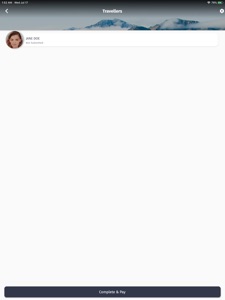
Skärmdump
Skärmdump
Skärmdump
Skärmdump

iPad-skärmavbilder

Skärmdump
Skärmdump
Skärmdump
Skärmdump

Beskrivning

NZeTA – Get it before you go
Download this free official New Zealand government app and use it to request your NZeTA and pay the IVL. The app is the fastest way to request an NZeTA and should take you less than 5 minutes.
You can use the app to scan your passport to upload your details and scan your credit or debit card for ease of payment. An NZeTA request costs NZD $9.
You can request and pay for up to 10 NZeTAs in one transaction for your family or group.
What are the NZeTA & IVL?
The NZeTA is a border security measure introduced by the New Zealand Government on 1 October 2019.
To find out more, visit the Immigration New Zealand website. https://www.immigration.govt.nz/nzeta
Most visitors coming to New Zealand must pay an International Visitor Conservation and Tourism Levy (IVL) of NZD $35. The IVL is a way for you to contribute directly to the tourism infrastructure you use and help protect the natural environment you enjoy during your stay in New Zealand. For more information on the IVL, visit this website https://www.mbie.govt.nz/immigration-and-tourism/tourism/tourism-funding/international-visitor-conservation-and-tourism-levy/.
The Legal stuff
Immigration New Zealand (INZ) will use the information you provide in this app about yourself or others, including photographs, to assess NZeTA requests. Information may also be used to improve INZ’s services and administration of the Immigration Act 2009. See our privacy statement (https://www.immigration.govt.nz/about-us/site-information/privacy) for more information about our handling of personal information and your rights. The use of this app is subject to our terms of use https://www.immigration.govt.nz/about-us/site-information/terms-of-use.
It is your responsibility to ensure that to the best of your knowledge the information you provide via this app is accurate and that you answer the questions truthfully and correctly. The information will be retained and will become part of New Zealand immigration records. INZ may provide information to other agencies in New Zealand and overseas where such disclosure is required or permitted by the Privacy Act 1993, or otherwise required or permitted by law.

Nyheter i version 1.2.0

Over 400,000 travellers have now used this official New Zealand government app to successfully request their NZeTA.
The new version (1.2.0) allows you to check your NZeTA status even if you requested your NZeTA on a different device or via a different channel. You can now make multiple NZeTA requests from the same device without deleting previous requests and payment by American Express has been enabled.

Säljare

Namn

Ministry of Business, Innovation and Employment

URL

Information

Kategorier

Version

1.2.0

Storlek

84,9 MB

Game Center

Nej

VPP Device Licensing

Ja

Betyg

Åldersgräns: 4+

Kompatibilitet

iOS 11.2 eller senare

Enheter

iPhone 5s, iPhone 6, iPhone 6 Plus, iPhone 6s, iPhone 6s Plus, iPhone SE, iPhone 7, iPhone 7 Plus, iPhone 8, iPhone 8 Plus, iPhone X, iPhone XR, iPhone XS, iPhone XS Max, iPhone 11, iPhone 11 Pro, iPhone 11 Pro Max, iPhone SE (2:a generationen), iPhone 12, iPhone 12 Pro, iPhone 12 Pro Max, iPhone 12 mini, iPhone 13, iPhone 13 Pro, iPhone 13 Pro Max, iPhone 13 mini, iPhone SEThirdGen, iPad (5:e generationen) Wi-Fi, iPad (5:e generationen) Wi-Fi + Cellular, iPad (6:e generationen) Wi-Fi, iPad (6:e generationen) Wi-Fi + Cellular, iPad Pro, iPad Pro (Cellular), iPad Pro (9,7-tums), iPad Pro (9,7-tums) (Cellular), iPad Pro 12,9 tum (2:a generationen), iPad Pro 12,9 tum (2:a generationen) Wi-Fi + Cellular, iPad Pro (10,5 tum), iPad Pro (10,5 tum) Wi-Fi + Cellular, iPad Pro (11 tum), iPad Pro (11 tum) Wi-Fi + Cellular, iPad Pro 12,9 tum (tredje generationen), iPad Pro 12,9 tum (tredje generationen) Wi-Fi + Cellular, iPad Air, iPad Air (Cellular), iPad Air 2, iPad Air 2 (Cellular), iPad Air (tredje generationen), iPad Air (tredje generationen) Wi-Fi + Cellular, iPad mini Retina, iPad mini Retina (Cellular), iPad mini 3, iPad mini 3 (Cellular), iPad mini 4, iPad mini 4 (Cellular), iPad mini (5:e generationen), iPad mini (5:e generationen) Wi-Fi + Cellular, iPad (7:e generationen) Wi-Fi + Cellular, iPad Pro 11 tum (2:a generationen), iPad Pro 11 tum (2:a generationen) Wi-Fi + Cellular, iPad Pro 12,9 tum (4:e generationen), iPad Pro 12,9 tum (4:e generationen) Wi-Fi + Cellular, iPad Air (fjärde generationen) (Wi-Fi), iPad Air (fjärde generationen) (Wi-Fi + Cellular), iPad (8:e generationen) Wi-Fi, iPad (8:e generationen) Wi-Fi + Cellular, iPad Pro 11 tum (tredje generationen), iPad Pro 11 tum (tredje generationen) Wi-Fi + Cellular, iPad Pro 12,9 tum (5:e generationen), iPad Pro 12,9 tum (5:e generationen) Wi-Fi + Cellular, iPad (9:e generationen), iPad (9:e generationen) Wi-Fi + Cellular, iPad mini (6:e generationen), iPad mini (6:e generationen) Wi-Fi + Cellular, iPad AirFifthGen, iPad AirFifthGenCellular, iPod touch (sjätte generationen), iPod touch (7:e generationen)

Språk

engelska

App Store: Kundbetyg

Betyg och recensioner

2,0 av 5 (5 betyg)

App Store: Kundrecensioner

2020-01-31

App crashes

Nice idea with the app but it crashes everytime I’m supposed to take the picture.
Ch24632
Version 1.1.2
2020-01-08

You’ll need patience...

The idea to apply thru an app is great, the execution however not so much.
I started with my own passport, and went thru all the steps. All good. I then added my husband, but his passport was apparently hard to detect. The app self closed and all my data disappeared 😣
Sinced they missed to inform about the ”add a selfie” in the specs I was not able to add the children in the same application as my own (they were asleep). It was neither possible to add them afterwards since the menu screen is different once the application is in progress or approved. Would downloading the app again remove my approved NZeTA/IVL?
He borrows my phone
Version 1.1.2
2019-12-23

Taking a photo doesn’t work

It’s obvious that this app needs a lot of work still. I tried to take a photo in step 2 about 20 times (with a white background and good lighting). “Your face is not detected” it says. I don’t know how to proceed with my eta application now.
Dodilodi
Version 1.1.2
2019-09-11

Can’t pay. Nothing happens

All works well until payment 4/4. After typing in all data and pressing payment nothing happens. Tried pressing again after a while. Tried pressing only one time and several different credit cards. Also can be a good idea to inform what card that is acceptable, now I figured it out by fault messages that Amex is not working. But I tried normal visa as well - still nothing happen when I press pay.
dh traveller
Version 1.0.1