OmVillkorSekretessKontakt
 
Uppdaterar
Adobe Aero

Adobe Aero

Släppt: 2019-11-05
© 2021 Adobe Inc.
Adobe Aero - QR Code
Version 2.9.2
4+
Hämta i App Store
Version 2.9.2
4+
Hämta i App Store
Släppt: 2019-11-05
© 2021 Adobe Inc.

iPhone-skärmavbilder

Skärmdump
Skärmdump
Skärmdump
Skärmdump
Skärmdump
Skärmdump
Skärmdump
Skärmdump
Skärmdump

iPad-skärmavbilder

Skärmdump
Skärmdump
Skärmdump
Skärmdump
Skärmdump
Skärmdump
Skärmdump
Skärmdump
Skärmdump

Beskrivning

Design interactive immersive experiences by bringing your design skills into the world of Augmented Reality. No coding or 3D design experience necessary.
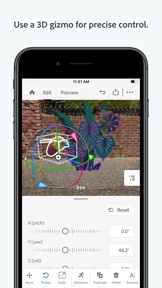
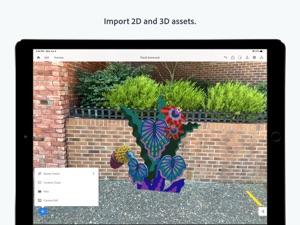
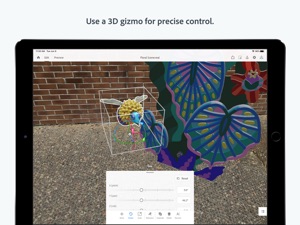
See your content in Augmented Reality by easily bringing in 3D models, photos, layered files and other 2D from Photoshop and Illustrator, or images from phone or desktop or Creative Cloud files. You can also bring in assets from other 3rd party applications like Maya and C4D and place assets in the real world environment around you, already optimized to look great in your AR experience. Placing assets is easy with familiar gestures to rotate, scale and move.
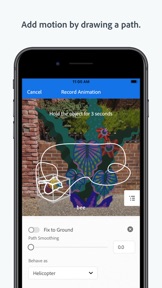
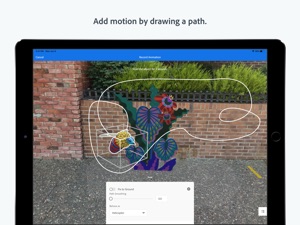
Create interactive experiences without needing to rely on a developer. Apply behaviors to your content to build combinations of triggers and actions that draw viewers of your experience to drive the narrative and engage with the story. Add motion to your objects by using your mobile device to draw the path of motion you want the object to take.
Whether you’ve completed your design, or still want feedback from other collaborators, Aero gives you the power to share your files in multiple formats for easy viewing. Send a link so others can interact with your creation in Aero on their own device in viewer mode. Export a file that can be embedded in a 3rd party app. Or, share your project as a recorded video on social media using #AdobeAero. Switch to Preview mode for fast feedback on how the edits you make will look and feel for viewers of your experience. Easily test how interactions and placement of your assets will enhance your scene and record quick videos or take snapshots of your work in progress so you share and get input for rapid iteration.
COMPATIBILITY
Supported operating system
• iPhone and iPadOS 13.2.1 and above
Supported system requirements
• ARKit 2 and above
Supported devices
• iPhone 8 Plus
• iPhone X, XR, XS, XS Max
• iPhone 11, 11 Pro, 11 Pro Max
• iPhone 12, 12 Pro, 12 Pro Max, 12 mini
• iPad Pro (Wi-Fi, Wi-Fi + Cellular)
• iPad Pro (12.9-inch) 3rd Generation
• iPad Pro (11-inch)
• iPad Mini 5
• iPad Air 3
Use of Adobe mobile apps and online services require registration for an Adobe ID for any level of Creative Cloud membership, which may not be available in all countries or languages, and may be subject to change or discontinuation without notice. Adobe online services require an internet connection.
You must be 13 or older and agree to Adobe’s terms and privacy policy:
http://www.adobe.com/go/terms_linkfree
Do Not Sell My Information: https://www.adobe.com/privacy/ca-rights-linkfree.html

Nyheter i version 2.9.2

This release includes new features, improvements to stability, performance, and bug fixes.
NEW FEATURE
Ability to swap assets in and out while preserving transform and behavior choices.
BUG FIXES/IMPROVEMENTS
Improved experience when importing Photoshop documents
KNOWN ISSUES / LIMITATIONS
Exporting a Universal Scene Description (.usdz) filetype will not preserve added behaviors.
• This is a limitation of the format.
• Export to .real filetype to preserve behaviors
COMMUNICATING WITH US
Post feature requests to UserVoice forum.
GENERAL
Please take the time to update your devices to iOS 13.2.1 or above. This is our current baseline for supported iOS operating systems.

Information

Utvecklare

Kategorier

Version

2.9.2

Storlek

448 MB

Game Center

Nej

VPP Device Licensing

Ja

Betyg

Åldersgräns: 4+

Kompatibilitet

iOS 13.1 eller senare

Enheter

iPhone 6s, iPhone 6s Plus, iPhone SE, iPhone 7, iPhone 7 Plus, iPhone 8, iPhone 8 Plus, iPhone X, iPhone XR, iPhone XS, iPhone XS Max, iPhone 11, iPhone 11 Pro, iPhone 11 Pro Max, iPhone SE (2:a generationen), iPhone 12, iPhone 12 Pro, iPhone 12 Pro Max, iPhone 12 mini, iPhone 13, iPhone 13 Pro, iPhone 13 Pro Max, iPhone 13 mini, iPad (5:e generationen) Wi-Fi, iPad (5:e generationen) Wi-Fi + Cellular, iPad (6:e generationen) Wi-Fi, iPad (6:e generationen) Wi-Fi + Cellular, iPad Pro, iPad Pro (Cellular), iPad Pro (9,7-tums), iPad Pro (9,7-tums) (Cellular), iPad Pro 12,9 tum (2:a generationen), iPad Pro 12,9 tum (2:a generationen) Wi-Fi + Cellular, iPad Pro (10,5 tum), iPad Pro (10,5 tum) Wi-Fi + Cellular, iPad Pro (11 tum), iPad Pro (11 tum) Wi-Fi + Cellular, iPad Pro 12,9 tum (tredje generationen), iPad Pro 12,9 tum (tredje generationen) Wi-Fi + Cellular, iPad Air (tredje generationen), iPad Air (tredje generationen) Wi-Fi + Cellular, iPad mini (5:e generationen), iPad mini (5:e generationen) Wi-Fi + Cellular, iPad (7:e generationen) Wi-Fi + Cellular, iPad Pro 11 tum (2:a generationen), iPad Pro 11 tum (2:a generationen) Wi-Fi + Cellular, iPad Pro 12,9 tum (4:e generationen), iPad Pro 12,9 tum (4:e generationen) Wi-Fi + Cellular, iPad Air (fjärde generationen) (Wi-Fi), iPad Air (fjärde generationen) (Wi-Fi + Cellular), iPad (8:e generationen) Wi-Fi, iPad (8:e generationen) Wi-Fi + Cellular, iPad Pro 11 tum (tredje generationen), iPad Pro 11 tum (tredje generationen) Wi-Fi + Cellular, iPad Pro 12,9 tum (5:e generationen), iPad Pro 12,9 tum (5:e generationen) Wi-Fi + Cellular, iPad (9:e generationen), iPad (9:e generationen) Wi-Fi + Cellular, iPad mini (6:e generationen), iPad mini (6:e generationen) Wi-Fi + Cellular, iPod touch (7:e generationen)

Språk

engelska, franska, japanska, tyska

App Store: Kundbetyg

Betyg och recensioner

4,5 av 5 (50 betyg)

App Store: Kundrecensioner

2019-11-05

iPhone XS

Can’t even open the app, keeps crashing
Longgatan
Version 1.1.1