Uppdaterar


iPhone-skärmavbilder


iPad-skärmavbilder



Beskrivning
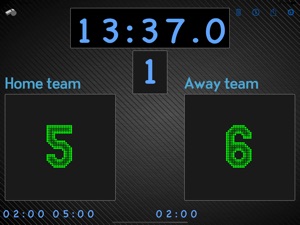
Versatile and highly customizable scoreboard that lets you track any game and share standings and results with friends and family! Can even be used as a "real" scoreboard by mirroring the display to a larger screen.
Features:
- Chose between 4 different layouts when presented on an external screen.
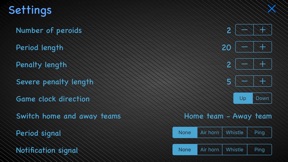
- Adjustable length- and number of periods
- Change team names (and switch home- and away teams from the settings screen)
- Penalties - shows up to three concurrent penalties per team, supports unlimited concurrent penalties. Penalties can be edited and removed.
- Shot clock
- All clocks can be adjusted, even while still running. Long tap/hold the clock to enter edit mode.
- Change clock direction
- Get a notification when the period/game ends if the app is running in the background (you need to accept push notifications for this to work)
- Configurable signal at end of period and end of game, at shot clock and penalty expiration.
- Customize the colors and fonts of clocks, scores and teams individually.
- Select your own background for an even more personal touch.
- Share results on Facebook, Twitter, Email, MMS etc.
- Use the companion Apple Watch app to control the scoreboard from your wrist.
Instructions:
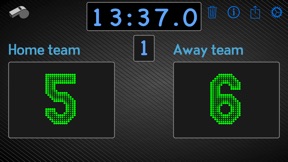
Tap the score with one finger for one point, two fingers for two points and three fingers for three points. You can also swipe up or right to increase the score by one or swipe left or down to remove the last added point(s).
Tap on the team names to change them, tap on the game clock to start/pause it. Tap on the period to change to the next period.
To give either team a penalty, tap the whistle icon in the top left.
All clocks (match clock, penalties, shot clock) can be edited by long pressing them.
Adjust the length and number of periods, the length of penalties and so on from the settings menu. You can also switch home and away teams from here.
Tap the trashcan icon to reset the current game. It will keep the team names but clear everything else like match clock, penalties, current period and scores.
Use the share icon to share results with MMS/Facebook/Twitter/Email etc or save it to your photo album as a dear memory of that big win.
Watch app:
- swipe left and right to switch between screens
- on the score screen, tap each team button to add a point and swipe down on the button to undo the latest point
- on the game time screen, tap the time to start/stop the game clock.
Nyheter i version 2.4.1
This version allows for setting period- and penalty lengths with minute and second granularity.
It also fixes another bug that would sometimes caused the app to crash on launch.
Thanks for all the feedback. If you have any questions or issues with the app, or ideas to make it better, please do get in touch: ultimatescoreboard@agidev.se
Information
Utvecklare
Kategorier
Version
2.4.1
Storlek
22 MB
Game Center
Nej
VPP Device Licensing
Ja
Betyg
Åldersgräns: 4+
Kompatibilitet
iOS 13.0 eller senare
Enheter
iPhone 5s, iPhone 6, iPhone 6 Plus, iPhone 6s, iPhone 6s Plus, iPhone SE, iPhone 7, iPhone 7 Plus, iPhone 8, iPhone 8 Plus, iPhone X, iPhone XR, iPhone XS, iPhone XS Max, iPhone 11, iPhone 11 Pro, iPhone 11 Pro Max, iPhone SE (2:a generationen), iPhone 12, iPhone 12 Pro, iPhone 12 Pro Max, iPhone 12 mini, iPhone 13, iPhone 13 Pro, iPhone 13 Pro Max, iPhone 13 mini, iPad (5:e generationen) Wi-Fi, iPad (5:e generationen) Wi-Fi + Cellular, iPad (6:e generationen) Wi-Fi, iPad (6:e generationen) Wi-Fi + Cellular, iPad Pro, iPad Pro (Cellular), iPad Pro (9,7-tums), iPad Pro (9,7-tums) (Cellular), iPad Pro 12,9 tum (2:a generationen), iPad Pro 12,9 tum (2:a generationen) Wi-Fi + Cellular, iPad Pro (10,5 tum), iPad Pro (10,5 tum) Wi-Fi + Cellular, iPad Pro (11 tum), iPad Pro (11 tum) Wi-Fi + Cellular, iPad Pro 12,9 tum (tredje generationen), iPad Pro 12,9 tum (tredje generationen) Wi-Fi + Cellular, iPad Air, iPad Air (Cellular), iPad Air 2, iPad Air 2 (Cellular), iPad Air (tredje generationen), iPad Air (tredje generationen) Wi-Fi + Cellular, iPad mini Retina, iPad mini Retina (Cellular), iPad mini 3, iPad mini 3 (Cellular), iPad mini 4, iPad mini 4 (Cellular), iPad mini (5:e generationen), iPad mini (5:e generationen) Wi-Fi + Cellular, iPad (7:e generationen) Wi-Fi + Cellular, iPad Pro 11 tum (2:a generationen), iPad Pro 11 tum (2:a generationen) Wi-Fi + Cellular, iPad Pro 12,9 tum (4:e generationen), iPad Pro 12,9 tum (4:e generationen) Wi-Fi + Cellular, iPad Air (fjärde generationen) (Wi-Fi), iPad Air (fjärde generationen) (Wi-Fi + Cellular), iPad (8:e generationen) Wi-Fi, iPad (8:e generationen) Wi-Fi + Cellular, iPad Pro 11 tum (tredje generationen), iPad Pro 11 tum (tredje generationen) Wi-Fi + Cellular, iPad Pro 12,9 tum (5:e generationen), iPad Pro 12,9 tum (5:e generationen) Wi-Fi + Cellular, iPad (9:e generationen), iPad (9:e generationen) Wi-Fi + Cellular, iPad mini (6:e generationen), iPad mini (6:e generationen) Wi-Fi + Cellular, iPod touch (sjätte generationen), iPod touch (7:e generationen), Apple Watch Series 4
Språk
engelska
App Store: Kundbetyg
Betyg och recensioner
5,0 av 5 (3 betyg)
App Store: Kundrecensioner
Ingen post